Quality management · ISO 900129 modules
Quality Command Center
Right first time, on time — and proof for every audit.
An ISO 9001 quality management system: customer complaints and satisfaction, inspection and test, nonconformities and CAPA, supplier evaluation, design and development, calibration and quality KPIs — with a live quality dashboard and management review.
Explore all 29 modules Existing customer? Client login
Why teams use it
From the first report to the boardroom.
- Quality managers and engineers
- Supplier quality and purchasing
- Operations and production managers
- Leadership preparing ISO 9001 audits and management reviews
- 01
See quality live
Yield, on-time delivery, PPM, complaints and supplier performance on one dashboard, filtered by site and period.
- 02
Connect cause and action
A complaint or a failed lot raises its NCR and CAPA in the same step, so every problem is traceable to its fix.
- 03
Ready for the auditor
Policy, processes, objectives, audits and management review kept as controlled, approved records.
Modules
29 modules, one system.
Everything your quality team works with, in one connected system. Hover a row to pause it, or browse and search the full list.
- M-01
Quality Dashboard
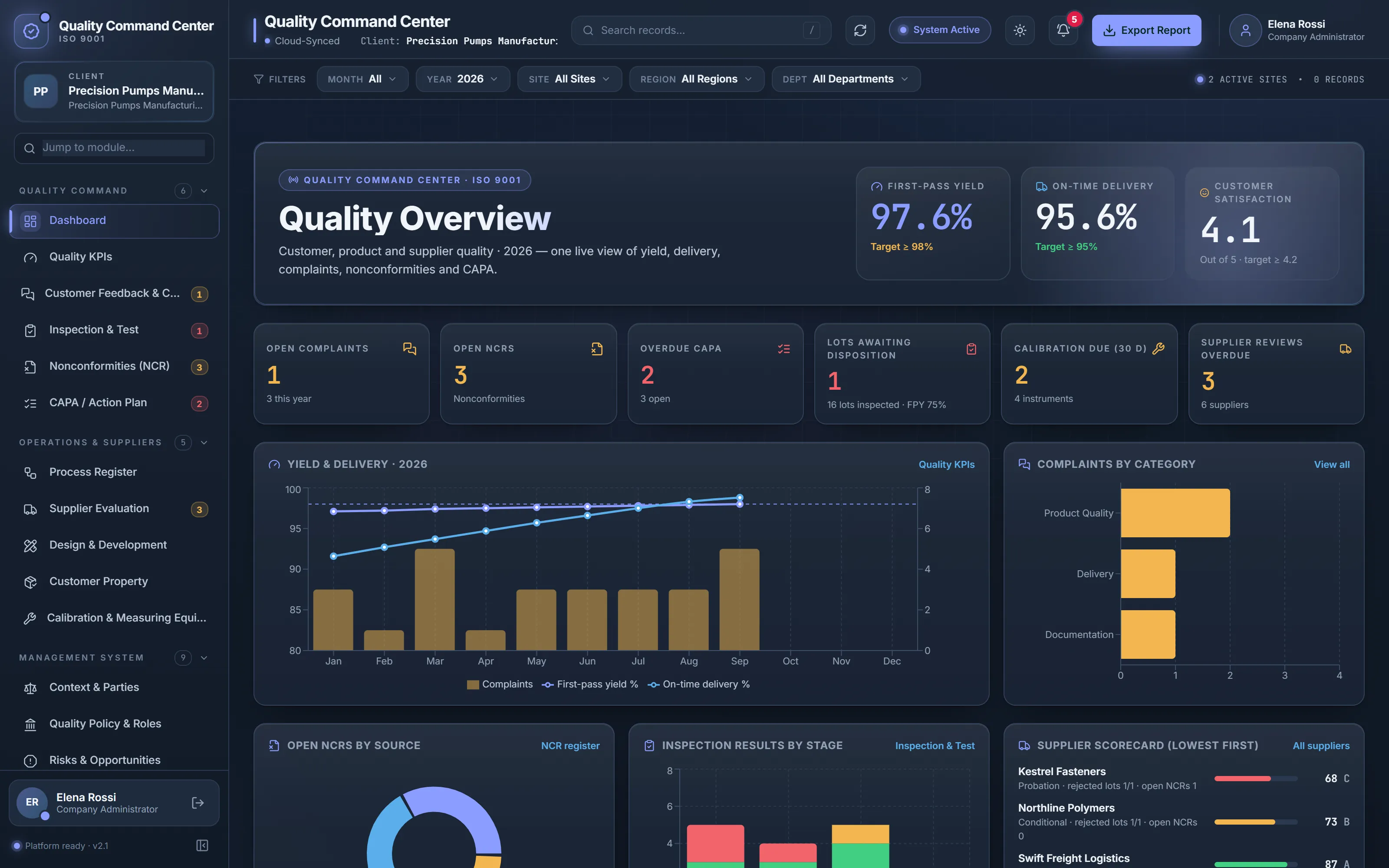
First-pass yield, on-time delivery, customer satisfaction, open complaints, NCRs and CAPA, supplier scorecard and inspection results on one live view.
Quality Command - M-04
Inspection & Test
Incoming, in-process and final inspection, product release and disposition of nonconforming output; failed lots raise their NCR (8.6, 8.7).
Quality Command - M-07
Process Register
The processes of the management system — owner, inputs, outputs, resources, KPI against target, risks and interactions (4.4).
Operations & Suppliers - M-10
Customer Property
Property supplied by customers and providers — identified, protected, and owners told about loss or damage (8.5.3).
Operations & Suppliers - M-13
Quality Policy & Roles
Policy, scope of the management system and the responsibility matrix — approved by top management (4.3, 5.2, 5.3).
Management System - M-16
Change Control
Planned changes reviewed, authorised and evaluated before they happen (6.3, 8.5.6).
Management System - M-19
Documents & Records
Controlled documents and records with system numbering, revisions, review dates and attached files (7.5).
Management System - M-22
Audit Plans & NCRs
Audit plans, nonconformities and independent verification of corrective action.
Audit & Review - M-25
Operational Reports
Monthly quality report, complaints, inspection & test, supplier performance, calibration and design status — PDF, Excel and CSV.
Reports - M-28
Activity Log
An audit trail of changes, with filters.
Administration
- M-02
Quality KPIs
Monthly per site: first-pass yield, on-time delivery, defect PPM, supplier lot rejection, customer satisfaction and cost of poor quality, with targets and trend (9.1).
Quality Command - M-05
Nonconformities (NCR)
Nonconforming outputs, customer and supplier nonconformities and audit findings with root cause, correction and verification (10.2).
Quality Command - M-08
Supplier Evaluation
Approved supplier list with weighted evaluation score and band, re-evaluation dates and live incoming-rejection and NCR performance (8.4).
Operations & Suppliers - M-11
Calibration & Measuring Equipment
Gauges, instruments and test equipment with calibration intervals and out-of-tolerance actions (7.1.5).
Operations & Suppliers - M-14
Risks & Opportunities
Risks and opportunities scored on a risk matrix, with owners, controls and residual risk (6.1).
Management System - M-17
Compliance Obligations
Statutory, regulatory, customer and other requirements with periodic evaluation.
Management System - M-20
Competence & Training
Competence, qualifications and training with 30-day expiry alerts (7.2, 7.3).
Management System - M-23
Management Review
Inputs, outputs, decisions, resources and actions — reviewed, approved and locked (9.3).
Audit & Review - M-26
Notifications & Alerts
What is overdue or expiring, in one list.
Reports - M-29
Settings
Company details, logo, sites, departments and master data.
Administration
- M-03
Customer Feedback & Complaints
Complaints, returns, compliments and surveys — and the NCR and corrective action raised from a complaint in the same step (8.2.1, 9.1.2).
Quality Command - M-06
CAPA / Action Plan
Corrective and preventive actions from complaints, inspection, audits, suppliers and management review, with owners and due dates.
Quality Command - M-09
Design & Development
Stage-gated projects — inputs, reviews, verification, validation, released outputs and controlled design changes (8.3).
Operations & Suppliers - M-12
Context & Parties
Internal and external issues, interested parties and their requirements (4.1, 4.2).
Management System - M-15
Quality Objectives
Objectives and targets with review, approval, progress and management-review linkage (6.2).
Management System - M-18
Communication Plan
What is communicated, when, to whom, how and by whom — internal and external (7.4).
Management System - M-21
Audit Programme
Internal, process, product, supplier, customer and certification audits with findings and scores (9.2).
Audit & Review - M-24
Governed Reports & Approvals
Report snapshots from source records, reviewed, approved, locked and exported with an audit trail.
Audit & Review - M-27
User Management
Users, roles and access; administrators sign in with an authenticator app.
Administration
Browse & search all 29 modules
Showing all 29 modules.
Quality Command
Day-to-day quality control and improvement.
Quality Dashboard
: First-pass yield, on-time delivery, customer satisfaction, open complaints, NCRs and CAPA, supplier scorecard and inspection results on one live view.Quality KPIs
: Monthly per site: first-pass yield, on-time delivery, defect PPM, supplier lot rejection, customer satisfaction and cost of poor quality, with targets and trend (9.1).Customer Feedback & Complaints
: Complaints, returns, compliments and surveys — and the NCR and corrective action raised from a complaint in the same step (8.2.1, 9.1.2).Inspection & Test
: Incoming, in-process and final inspection, product release and disposition of nonconforming output; failed lots raise their NCR (8.6, 8.7).Nonconformities (NCR)
: Nonconforming outputs, customer and supplier nonconformities and audit findings with root cause, correction and verification (10.2).CAPA / Action Plan
: Corrective and preventive actions from complaints, inspection, audits, suppliers and management review, with owners and due dates.
Operations & Suppliers
Processes, suppliers, design, customer property and measurement.
Process Register
: The processes of the management system — owner, inputs, outputs, resources, KPI against target, risks and interactions (4.4).Supplier Evaluation
: Approved supplier list with weighted evaluation score and band, re-evaluation dates and live incoming-rejection and NCR performance (8.4).Design & Development
: Stage-gated projects — inputs, reviews, verification, validation, released outputs and controlled design changes (8.3).Customer Property
: Property supplied by customers and providers — identified, protected, and owners told about loss or damage (8.5.3).Calibration & Measuring Equipment
: Gauges, instruments and test equipment with calibration intervals and out-of-tolerance actions (7.1.5).
Management System
The ISO 9001 management-system processes.
Context & Parties
: Internal and external issues, interested parties and their requirements (4.1, 4.2).Quality Policy & Roles
: Policy, scope of the management system and the responsibility matrix — approved by top management (4.3, 5.2, 5.3).Risks & Opportunities
: Risks and opportunities scored on a risk matrix, with owners, controls and residual risk (6.1).Quality Objectives
: Objectives and targets with review, approval, progress and management-review linkage (6.2).Change Control
: Planned changes reviewed, authorised and evaluated before they happen (6.3, 8.5.6).Compliance Obligations
: Statutory, regulatory, customer and other requirements with periodic evaluation.Communication Plan
: What is communicated, when, to whom, how and by whom — internal and external (7.4).Documents & Records
: Controlled documents and records with system numbering, revisions, review dates and attached files (7.5).Competence & Training
: Competence, qualifications and training with 30-day expiry alerts (7.2, 7.3).
Audit & Review
Audits, findings and the leadership review.
Audit Programme
: Internal, process, product, supplier, customer and certification audits with findings and scores (9.2).Audit Plans & NCRs
: Audit plans, nonconformities and independent verification of corrective action.Management Review
: Inputs, outputs, decisions, resources and actions — reviewed, approved and locked (9.3).Governed Reports & Approvals
: Report snapshots from source records, reviewed, approved, locked and exported with an audit trail.
Reports
Everyday reporting and what needs attention.
Operational Reports
: Monthly quality report, complaints, inspection & test, supplier performance, calibration and design status — PDF, Excel and CSV.Notifications & Alerts
: What is overdue or expiring, in one list.
Administration
Access, traceability and master data.
User Management
: Users, roles and access; administrators sign in with an authenticator app.Activity Log
: An audit trail of changes, with filters.Settings
: Company details, logo, sites, departments and master data.
No modules match that search. Try another term, or ask us.
Inside the Quality Command Center
Real screens, real workflows.
Each view below is the running software, captured with a demo company and fictional data. Select a screen to see it full size.
From a customer complaint to a closed CAPA
A complaint is logged with its severity, owner and satisfaction score. One step raises the nonconformity and the corrective action, and the three records stay linked until the fix is verified.
- 1Log the complaint or return
- 2Raise its NCR and CAPA in the same step
- 3Verify the fix and tell the customer
- Quality managers
- Customer service
- Operations
Supplier and product quality, live
Incoming, in-process and final inspection results feed the supplier scorecard at once: evaluation scores and bands next to live rejected lots and open NCRs for every supplier.
- 1Inspect the lot against its specification
- 2Record the disposition of anything that fails
- 3Re-evaluate, approve or put the supplier on probation
- Supplier quality
- Purchasing
- QC inspectors
How the work connects
Workflows, not just registers.
A few of the connections built into the product — each one checked against how the system actually behaves.
- 01
Customer complaint to closed CAPA
- Log the complaint with severity and owner
- Raise its NCR and CAPA in the same step
- Contain, find the root cause, correct
- Verify effectiveness and close; the customer is informed
- 02
Incoming lot to supplier performance
- Inspect the lot against its specification
- A failed lot gets its disposition and NCR
- The supplier scorecard shows the rejection at once
- Re-evaluate, put on probation or approve
- 03
Design project to release
- Plan and record design inputs
- Design review at each gate
- Verify outputs against inputs; validate for use
- Release with approval; control later changes
Reports & configuration
Reporting and set-up, in detail.
Operational reports for daily work, governed reports for formal records, and the master data your organization configures.
Operational reportsLive views for day-to-day analysis · PDF, Excel, CSV9
- Monthly Quality Report
- Customer Complaints Report
- Inspection & Test Report
- Supplier Performance Report
- Calibration Status Report
- Design & Development Status
- Nonconformity (NCR) Report
- Audit Report
- Action Tracking Report
Governed report definitionsSnapshot · review · approve · lock · audited PDF/CSV export3
- Management review pack
- Audit and NCR summaries
- Objectives and KPI performance
How it works
From order to go-live.
From your request to your team using the system — exactly what happens, step by step.
- Step 01
Choose your plan
Basic (up to 15 users), Team (16–30) or Business (31–100) — add seats for $99 each if you need a few more. 101+ users or special workflows? Contact us.
- Step 02
Send your request
Choose “Request” on the plan — monthly, or yearly with 2 months free — and tell us your company, administrator and number of seats.
- Step 03
We confirm
Our team confirms your plan, seats, billing and start date with you.
- Step 04
Activation link
We create your private workspace and email your administrator a secure, single-use activation link.
- Step 05
Activate & set up
Your administrator sets a password and an authenticator app, then adds sites, departments and users.
- Step 06
Go live
Teams record complaints, inspections, supplier evaluations and quality KPIs; leadership follows the live quality dashboard.
Custom plan: a consultation and a written quote first, then the same activation steps from step 4.Request a Custom quote
- BillingMonthly, or yearly with 2 months free, in US dollars. We confirm the details with you before you start.
- Your data stays yoursEach company works in its own isolated workspace. Administrators sign in with an authenticator app.
- Grow into the QHSE Command CenterStart with one discipline and upgrade to the QHSE Command Center later — your records stay where they are.
Plans
Choose how you get started.
Four plans sized by users: 1–15, 16–30, 31–100 and 101+. Request your plan, or start with a written quote for 101+ users.
Plan 01basic
Basic
Up to 15 usersFrom USD $499/month
Starting priceBilled monthly, or USD $4,990/year (2 months free) · extra seats USD $99/seat/month
Best for a single site or a small team getting started.
Request BasicIncluded
- The complete Quality Command Center
- Quality dashboard, KPIs and reports
- Complaints, inspection & test, NCR and CAPA
- Supplier evaluation, design & development, calibration
- Role-based access, authenticator sign-in and audit trail
- Built for growing teams
Plan 02team
Team
16–30 usersFrom USD $799/month
Starting priceBilled monthly, or USD $7,990/year (2 months free) · extra seats USD $99/seat/month
Best for multi-site teams sharing one picture.
Request TeamIncluded
- The complete Quality Command Center
- Quality dashboard, KPIs and reports
- Complaints, inspection & test, NCR and CAPA
- Supplier evaluation, design & development, calibration
- Role-based access, authenticator sign-in and audit trail
Plan 03business
Business
31–100 usersFrom USD $2,397/month
Starting priceBilled monthly, or USD $23,970/year (2 months free) · up to 100 users
Best for larger organizations with many sites and teams.
Request BusinessIncluded
- The complete Quality Command Center
- Quality dashboard, KPIs and reports
- Complaints, inspection & test, NCR and CAPA
- Supplier evaluation, design & development, calibration
- Role-based access, authenticator sign-in and audit trail
Plan 04custom
Custom
101+ usersContact us
Customized pricing for 101+ users
Best for 101+ users or specific structures and workflows.
Request a quoteIncluded
- Everything in the current release, scoped to your organization
- Configuration of sites, departments, roles and master data agreed with you
- Implementation approach and timeline in your written quote
Prices in US dollars, billed monthly — or yearly with 2 months free. Need a few more users than your plan includes? Add seats for USD $99 per seat per month (up to 100 users in total). To get started, choose your plan and send a request: our team confirms the plan, seats, billing and start date with you, then your administrator receives a secure activation link. 101+ users: contact us for customized pricing. Full pricing details →
Not ready to choose?
See Quality Command Center first in a guided demonstration.
| Aspect | Basic | Team | Business | Custom |
|---|---|---|---|---|
| Users (seats) | Up to 15 users | 16–30 users | 31–100 users | 101+ users |
| Monthly price | USD $499/month | USD $799/month | USD $2,397/month | Contact us — customized pricing |
| Yearly price (2 months free) | USD $4,990/year | USD $7,990/year | USD $23,970/year | Written quote |
| Additional seats | USD $99/seat/month or $990/seat/year | USD $99/seat/month or $990/seat/year | Up to 100 users; more: contact us | Included in your quote |
| How it starts | Order online → activation link | Order online → activation link | Order online → activation link | Consultation → written quote |
Plan questions
How do we get started?
Choose “Request” on Basic, Team or Business and send the short form. Our team confirms the plan, seats, billing (monthly, or yearly with 2 months free) and start date with you and sets up your private workspace; your administrator then receives a secure activation link.
Is there a yearly option?
Yes. Pay yearly in advance and get 2 months free: you pay for 10 months and use the plan for 12 — for example Basic is $4,990 a year instead of $5,988. Extra seats are $990 per seat per year.
What if we need more users than our plan includes?
Add seats for USD $99 per seat per month on top of your plan — for example Basic with 17 users is $499 + 2 × $99. You can also move up to the next plan at any time. Online plans go up to 100 users; for 101+ users, contact us for customized pricing.
Are the prices final?
They are the prices in US dollars for each plan — monthly, or yearly with 2 months free — plus USD $99 per additional seat per month. We confirm the total with you before you start.
How does the Custom quote work?
We start with a consultation about your structure and workflows, then send a written quote describing the configuration, implementation approach, timeline and price.
How does demo access work?
Request a demo and we will arrange a guided demonstration. Any evaluation access is agreed with you afterwards — there is no self-serve sign-up or automatic trial on this website.
Does using the software make us ISO 9001 certified?
No. The system helps you organize the records and reviews a management system needs; certification is granted only by an accredited certification body after an audit.
Is it the same application as the HSE Command Center?
Yes. One secure application with three products. The Quality Command Center gives your company the ISO 9001 modules and the shared management-system processes; you can upgrade to the QHSE Command Center later without moving your records.
We work to other standards, such as ISO 13485 for medical devices. Can you help?
Yes. For other or additional standards we build a customized Integrated Management System (IMS) around your standards and processes, on the same platform. Request a consultation and we will scope it with you.
Who is the Quality Command Center for?
Manufacturers and service organizations that run, or are building, an ISO 9001 quality management system across one or more sites.
Can we add HSE later?
Yes — upgrade to the QHSE Command Center and the health, safety and environment modules are added to the same workspace.
Are the screens on this page real?
Yes — screenshots of the real application with a fictional demo company and demo data.
Quality Command Center
Let’s talk about your requirements.
Tell us about your sites, your teams and the reporting you need. We will show you how Quality Command Center fits — or what a custom plan would include.